
Unknown needs investigation.
Missing observations, stale sources and conflicting results need attention. Check the source or obtain fresh proof. Where uncertainty and a deferral coexist, the coverage view keeps uncertainty visible.

Govern patch scope, recorded outcomes and independent review alongside the tools that deploy your updates.
2 assets · 1 required update
Baseline coverage and inventory inclusion are different measures.
Scanner observations, installation reports and verified outcomes answer different questions. In the payroll example, the gateway has a reviewed result while the portal remains unknown. The baseline stops one successful update becoming a whole-inventory claim. Vulnerability findings can provide context; routine updates need neither an invented finding nor a CVE.
Maya selects the published payroll policy, two active assets and update NS-2026-09, targeting version 4.2.
Maya selects the published payroll policy, two active assets and update NS-2026-09, targeting version 4.2. The baseline retains the policy version, 14-day observation freshness and a 30-day policy deadline. These are the example’s requirements, not product-wide defaults.
An independent eligible reviewer publishes the baseline; its creator cannot self-approve.
An independent eligible reviewer publishes the baseline; its creator cannot self-approve. Publication preserves the decision and policy basis. Changed assets or updates require a new baseline, keeping the earlier scope available for review.
Maya previews JSON observations naming asset, update, source, time, result and report reference.
Maya previews JSON observations naming asset, update, source, time, result and report reference. The capture shows one new observation, no duplicates and one omitted pair. The omitted record stays unchanged: absence means neither a successful update nor disappearance of earlier exposure.
Group a compatible update within one environment.
Group a compatible update within one environment. Retain the owner, maintenance window, timezone, test plan, change and rollback references. The payroll package covers the gateway, with an explained ownership override. Moving its maintenance window does not reset the policy deadline.
The endpoint tool performs installation.
The endpoint tool performs installation. The owner records installed, reboot-pending, failed, rolled-back or unknown execution with job reference and evidence. Maya records the gateway’s installation; it still needs fresh post-execution observations and independent review.
Alex independently checks the gateway’s fresh observations and evidence.
Alex independently checks the gateway’s fresh observations and evidence. The portal remains unknown. Each asset must satisfy all declared updates to count as verified. New observations can return an earlier decision for review; verification is not a permanent green label.
Choose a step to see the real record, the responsible person and the reason for the next action.
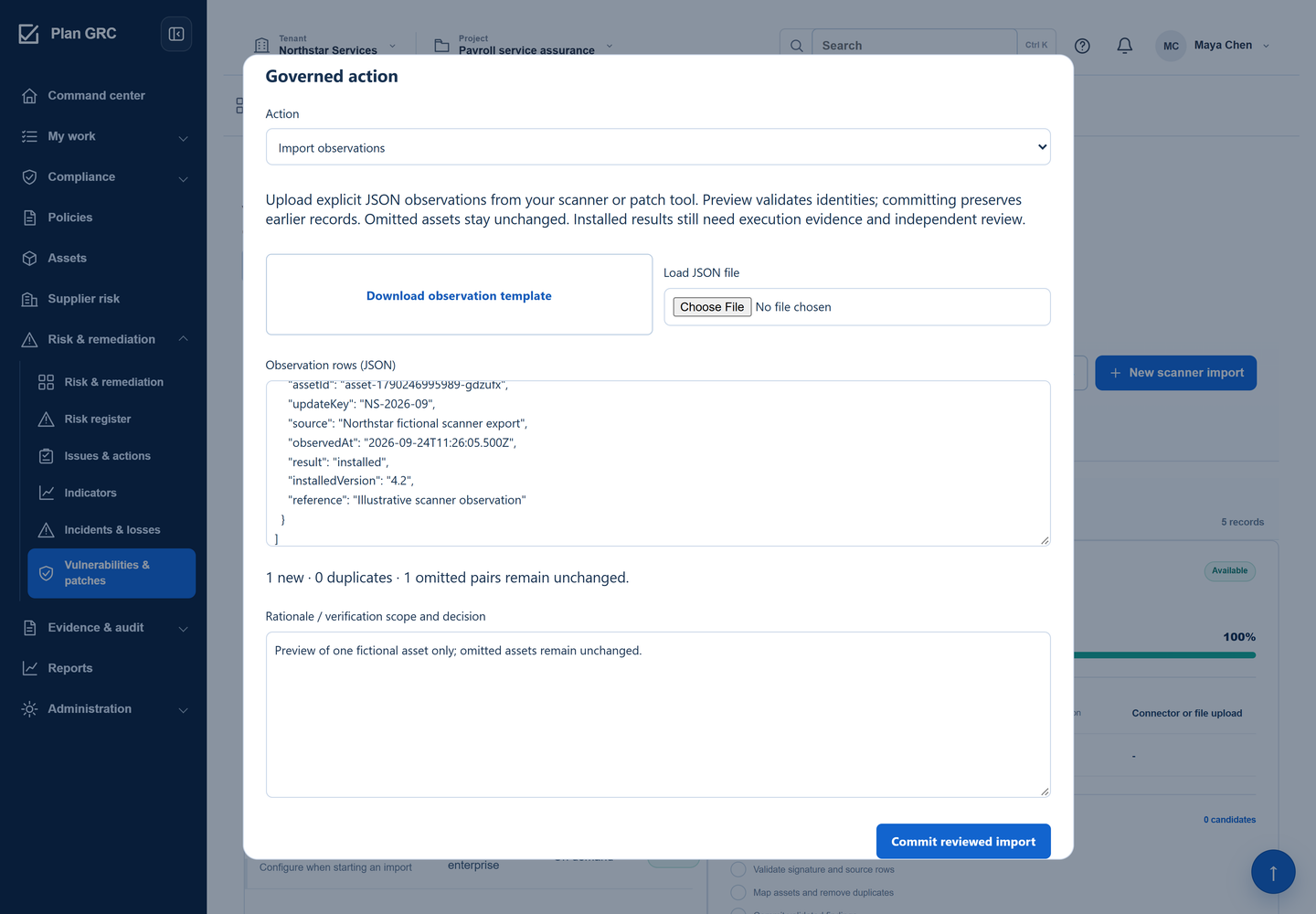
Maya previews observations from the scanner or patch tool. The preview identifies one new observation and one omitted asset–update pair. She can inspect the proposed change before committing the reviewed import.
A missing row cannot quietly turn an unknown result into a successful update.
One omitted pair remains unchanged; the screenshot shows an import preview.
Fictional workspace · English interface
Maya previews observations from the scanner or patch tool. The preview identifies one new observation and one omitted asset–update pair. She can inspect the proposed change before committing the reviewed import.
A missing row cannot quietly turn an unknown result into a successful update.
One omitted pair remains unchanged; the screenshot shows an import preview.
Open full product screen ↗The published payroll baseline names two assets and update NS-2026-09. Maya can see its policy reference, freshness requirement and service-level deadline alongside the population being assessed.
Everyone can tell which assets and updates a coverage statement includes before relying on it.
Two asset–update pairs; two of three active inventory assets are included.
Open full product screen ↗Maya coordinates the maintenance package and records an installed result with supporting evidence. Alex independently verifies that asset’s outcome. The per-asset view keeps the verified gateway separate from the portal’s unknown result.
The reviewer can distinguish an owner’s report from independently checked proof.
PlanGRC records and verifies outcomes. Your deployment tool performs installation.
Open full product screen ↗The coverage view shows one verified pair and one unknown pair. Maya follows up on the missing result with the accountable owner. Reviewed exclusions and deferred exposure have their own categories instead of counting as verified work.
A useful coverage view shows where to act next and makes the limits of the reported result clear.
One verified, one unknown. This is declared-baseline coverage, not whole-inventory compliance.
Open full product screen ↗Coverage counts assets across all their required updates. With one required update, this example’s two assets also represent two asset–update pairs. Inventory inclusion is a separate measure.
The payroll integration gateway has an independently reviewed result.
The payroll access portal still needs a verified outcome.
The published scope names update NS-2026-09 and target version 4.2.
The remaining inventory asset is outside this baseline’s assessment.
Distinct states help the team choose the right follow-up.
Missing observations, stale sources and conflicting results need attention. Check the source or obtain fresh proof. Where uncertainty and a deferral coexist, the coverage view keeps uncertainty visible.
An approved delay retains its reason, compensating controls and expiry. It does not become verified work or move the original policy deadline.
Review non-applicability independently. A superseded update is excluded only when its declared replacement is verified. An entirely excluded asset is not shown as verified.
No available fix, end of support or supplier-managed maintenance requires an open, owned follow-up issue and a future review date. The constraint itself is not acceptance or remediation.

PlanGRC coordinates scope, responsibility, evidence and review. It does not scan or install software. Scanner-provider contracts and readiness checks do not establish live integrations. Confirm your tools’ supported intake path before operational use.
Patch observations use the baseline-specific JSON template and preview. The separate vulnerability workflow supports reviewed CSV finding intake, asset matching and duplicate checks. Finding intake and patch verification are different processes.
Earlier history remains. New observations can invalidate the affected verification or applicability decision and return the work for review. An omitted row stays unchanged; it does not close an outcome.
No. Patch closure checks current outcomes and evidence, then follows the shared issue closure review. Linked findings, risks and supplier records retain their own decisions; they are not automatically closed.
Export a dated JSON record containing the baseline, policy basis, source history, evidence references, maintenance context, deadlines and exceptions. It preserves the declared scope; it is not a whole-estate compliance certificate.
Bring a policy, asset group and required update. Walk through intake, ownership, verification and remaining gaps in a focused demo.