
Response due dates
Track supplier invitations and due responses. Configured production email handles invitations; due-response reminders use the outbox when enabled.

Bring supplier scope, assessment, evidence and follow-up into one accountable review. Give your team the context to decide—and your suppliers a clear way to respond.
Start with the service, access and business dependency.
Bring responses, clarification and evidence into the review.
Retain decisions, findings, owners and next review dates.
A payroll provider and an office-supply company do not need the same assessment. Start with the service, its access and the business dependency. Use that exposure to choose a proportionate review.
Register the supplier and the service you use.
Register the supplier and the service you use. Name the internal owner, describe the data and access involved, and assess criticality and dependency before choosing the review depth.
Prepare the assessment for that service.
Prepare the assessment for that service. Invite the supplier to a restricted response workspace, assign relevant sections and collect answers and supporting documents without granting access to your tenant workspace.
Review applicable answers, ask targeted clarification questions and retain the exchange.
Review applicable answers, ask targeted clarification questions and retain the exchange. A missing answer or weak evidence remains visible; receiving a response is not the same as accepting it.
Record findings for the gaps.
Record findings for the gaps. An independent authorized Tenant Admin or GRC Lead records the final decision. Conditional use keeps its rationale, safeguards and expiry alongside the review.
Follow the finding’s owned remediation ticket, created with the finding.
Follow the finding’s owned remediation ticket, created with the finding. Keep the finding and decision visible while the responsible team works; approval does not make unfinished remediation disappear.
Use renewal, reassessment and acceptance-expiry queues to revisit the relationship.
Use renewal, reassessment and acceptance-expiry queues to revisit the relationship. Offboarding and archival follow their own checks. A new review does not silently close an earlier finding.
Choose a step to see the real record, the responsible person and the reason for the next action.
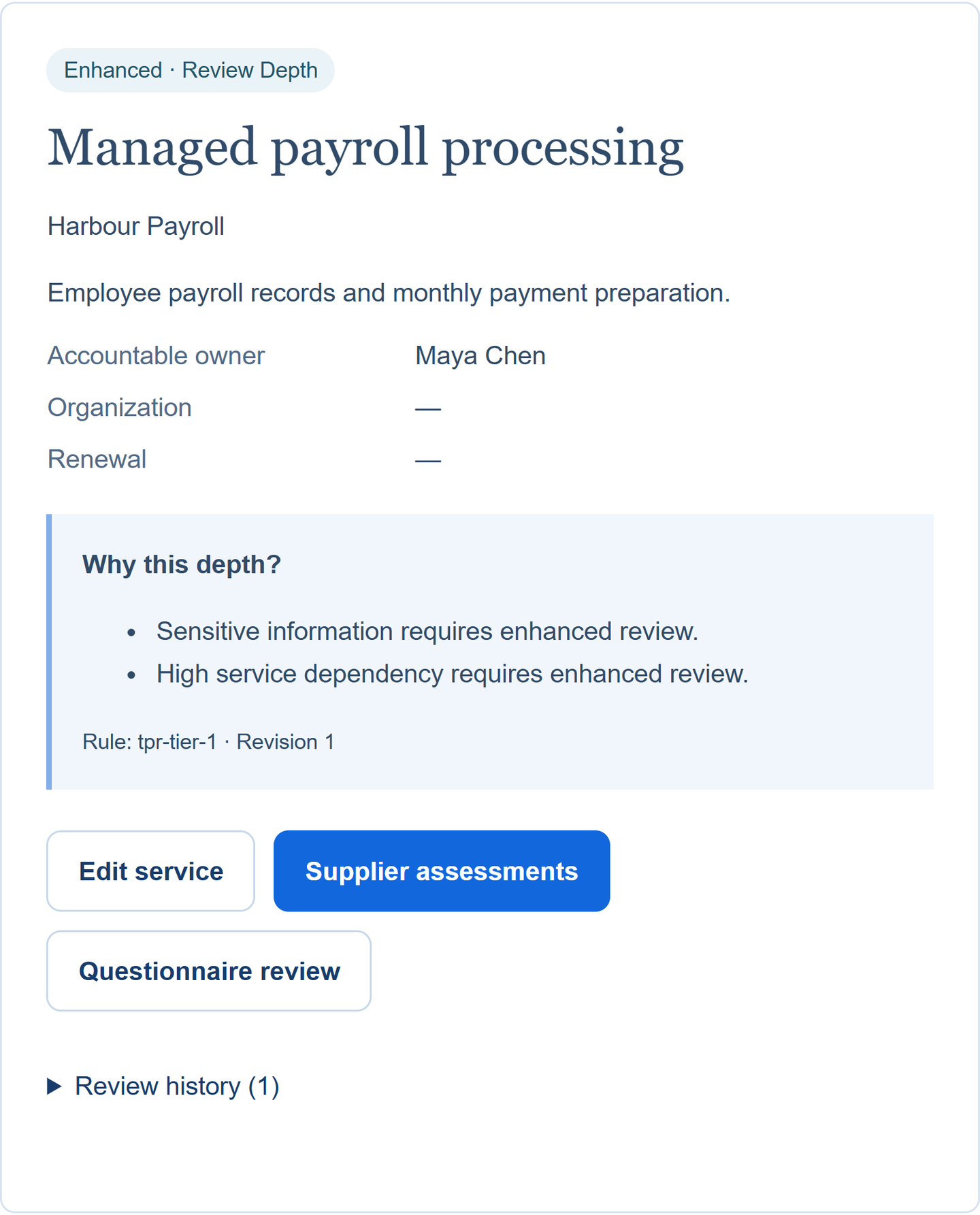
Maya records Harbour Payroll and its payroll processing service separately. Sensitive employee information and a high operational dependency call for enhanced review, with a named internal owner.
Review effort follows the service’s exposure, so the team can explain why this supplier needs closer attention.
One supplier, one service, enhanced review.
Fictional workspace · English interface
Maya records Harbour Payroll and its payroll processing service separately. Sensitive employee information and a high operational dependency call for enhanced review, with a named internal owner.
Review effort follows the service’s exposure, so the team can explain why this supplier needs closer attention.
One supplier, one service, enhanced review.
Open full product screen ↗Harper answers the assigned service, access and continuity questions in the supplier portal. The receipt preserves the submitted response. Internal review notes and decision controls remain in the internal workspace.
The supplier knows what to provide, while the assessor keeps a stable submission to review.
Three of three responses are saved. Completion does not mean approval.
Open full product screen ↗Maya reviews all three answers. Two are adequate; the account-removal answer reveals a gap. She records a finding requiring evidence of daily leaver reconciliation, with an owner and due date.
A completed questionnaire becomes a reasoned review with a concrete next action.
All three questions reviewed; one finding remains unverified.
Open full product screen ↗Alex independently approves conditional use of the service. Maya can revisit the recorded safeguards, expiry and decision history. The open finding still needs its own proof and verification.
The next reviewer can see who agreed to continued use, on what basis, and what is still unfinished.
Conditional approval is recorded; it does not close the finding.
Open full product screen ↗In the fictional Harbour Payroll review, Alex independently approves conditional use. The recorded decision retains safeguards and an expiry; an open finding remains part of the next review.
The assessment follows this service’s sensitivity and dependency.
An independent decision with a rationale and safeguards.
The decision does not erase work that is still open.
You may be the supplier in someone else’s review. Customer Assurance gives your team a separate, controlled way to prepare a response using answers that have already been reviewed.
Preview and confirm explicitly mapped CSV questions, then prepare the response in the workspace.
Preview and confirm explicitly mapped CSV questions, then prepare the response in the workspace. Keep the customer and service context with the request.
Select current approved library answers.
Select current approved library answers. Preserve whether each is evidenced, a statement or unknown, together with its limitation, evidence references and expiry.
An independently approved library answer is a starting point.
An independently approved library answer is a starting point. An authorized independent reviewer must still approve what this specific customer may receive.
Export the approved JSON or CSV response with its evidence manifest.
Export the approved JSON or CSV response with its evidence manifest. Revalidate answer versions and evidence freshness; documents and internal links are not bundled, and the response is not automatically sent.
 Approval does not send the response.
Follow-up has different owners and different triggers. Make the next action visible without pretending every reminder is delivered through the same channel.
Track supplier invitations and due responses. Configured production email handles invitations; due-response reminders use the outbox when enabled.
Use the in-app lifecycle queue for renewal, reassessment, acceptance expiry and remediation reminders.
Return to the recorded service scope, evidence and findings when the relationship changes. Reassessment and closure remain explicit decisions.
Your internal team owns the assessment and decision. The invited supplier sees its permitted assessment and assigned response sections. An executive dashboard does not grant supplier-approval authority, and PlanGRC does not provide an external security rating.
Yes. Third-party assessment manages your review of a supplier. Customer Assurance manages your response to a customer. They share useful context, but keep their participants and approval decisions separate.
No. The service’s exposure and review depth guide the assessment you prepare. Keep the question set proportionate to the data, access and dependency involved.
No. Conditional approval retains its safeguards and open findings. Customer Assurance requires a separate customer-specific disclosure approval and produces an export; it does not send the response automatically.
Use reviewed library answers while their versions, evidence and expiry remain valid. Each new customer response still needs the appropriate independent approval.
Walk through a service you depend on—or an assessment your own customer has sent you.